RECOVEASE • POST-OPERATIVE CARE COMPANION
RecovEase: Post-operative recovery you can actually stick to.
Post-operative care is plagued by fragmented discharge instructions, medication confusion, and anxiety during independent home recovery. RecovEase unifies task routines, symptom logs, and clinician communication into an encouraging patient companion.
5
USER-CENTERED PHASES
4
CORE PATIENT MODULES
85%
DEMAND FOR UNIFIED APP
1
SEAMLESS CARE ECOSYSTEM
Post-operative recovery shouldn’t feel like guessing in the dark.
After leaving the hospital, patients transition from 24/7 clinical supervision to managing complex medication schedules, wound care routines, and rehabilitation exercises entirely alone at home.
How might we coordinate post-operative care without overwhelming the patient?
Patients struggle with tracking multiple daily pills, complex wound dressing instructions, and anxiety over normal vs. abnormal symptoms. Missing a step causes panic or medical complications, while paper booklets get lost or forgotten.
- • Paper-based discharge packets fail to provide time-sensitive reminders
- • Anxiety and lack of progress clarity trigger accidental non-compliance
- • Zero integrated link between daily logs and doctor follow-up visits
A calm, unified mobile companion that organizes recovery into clear daily milestones.
RecovEase turns a clinician's care plan into actionable daily tasks: medication checklists with dose instructions, timed rehab stretches, quick symptom logging, and verified recovery resources — all in one accessible interface.
- ✓ Time-stamped daily task list with clear completion states
- ✓ 1-tap symptom check-in with doctor-accessible remark history
- ✓ Emergency contact & surgeon details accessible in 1 tap
User-Centered Design Process
Following standard human-centered design principles, each phase bridged qualitative patient interviews with quantitative survey validation.
User Research
Patient interviews & surveys on medication adherence and post-op anxiety.
Persona & Journey
Empathy mapping, pain-point clustering, and core behavioral hurdles.
Feature Roadmap
Information architecture, screen menus, and multi-step task user flows.
Visual System
Accessible mobile interfaces, soft reassuring palettes, and clear glanceability.
Usability Testing
Feedback on symptom logging, task completion speed, and visual reassurance.
Qualitative Interviews & Quantitative Validation
To ground design decisions in real patient realities, qualitative interviews explored daily post-op routines, while quantitative surveys evaluated feature priorities and communication habits.
Medication Overwhelm
Patients juggle varying dosages, pre/post meal restrictions, and tapering schedules across multiple antibiotics and pain medications.
Anxiety Over Complications
Lack of objective progress markers makes patients wonder: "Is this amount of swelling normal on Day 4?" leading to fear and panic.
Disconnected Care Systems
Discharge instructions, doctor contact info, and pharmacy records exist in separate silos with zero automated coordination.
Key Survey Findings
27.3%
Most requested feature
Progress Tracking — the single most desired capability, above medication reminders and direct messaging.
85%
Prefer a unified platform
The majority of respondents said "Yes" to integrating medication, symptoms, and communication into one app.
4 in 7
Forget medications "sometimes" or "often"
A majority of patients reported unreliable medication adherence without automated reminders.
In-person
Dominant communication channel
Most patients rely on in-person visits for follow-ups, missing timely guidance in between appointments.
Understanding the Patient: Abha Sharma
Synthesizing research interviews led to our primary persona: a young professional managing post-surgical rehabilitation independently while striving to resume an active routine.
Abha Sharma, 25
UI/UX Designer • Single • Recovering from Orthopedic Surgery
Goals
- • Smooth and predictable recovery
- • Independence in daily care
- • Timely resumption of active lifestyle
Frustrations
- • Complex, confusing discharge instructions
- • Balancing work duties with recovery
- • Anxiety about unnoticed complications
Design Requirements
- • Automated dosage & appointment pings
- • Visual recovery milestone tracker
- • Reassuring, clutter-free UI design
Structuring the Patient Flow for Low Cognitive Load
Patients recovering from surgery often experience fatigue and reduced cognitive bandwidth. We organized the app around four core actions: viewing today's checklist, tracking progress over time, accessing educational guidance, and logging real-time symptoms.
High-Fidelity Interface Design
Each core flow addresses a specific vulnerability in home recovery, using high-contrast text, calm visual palettes, and 1-tap confirmation states.
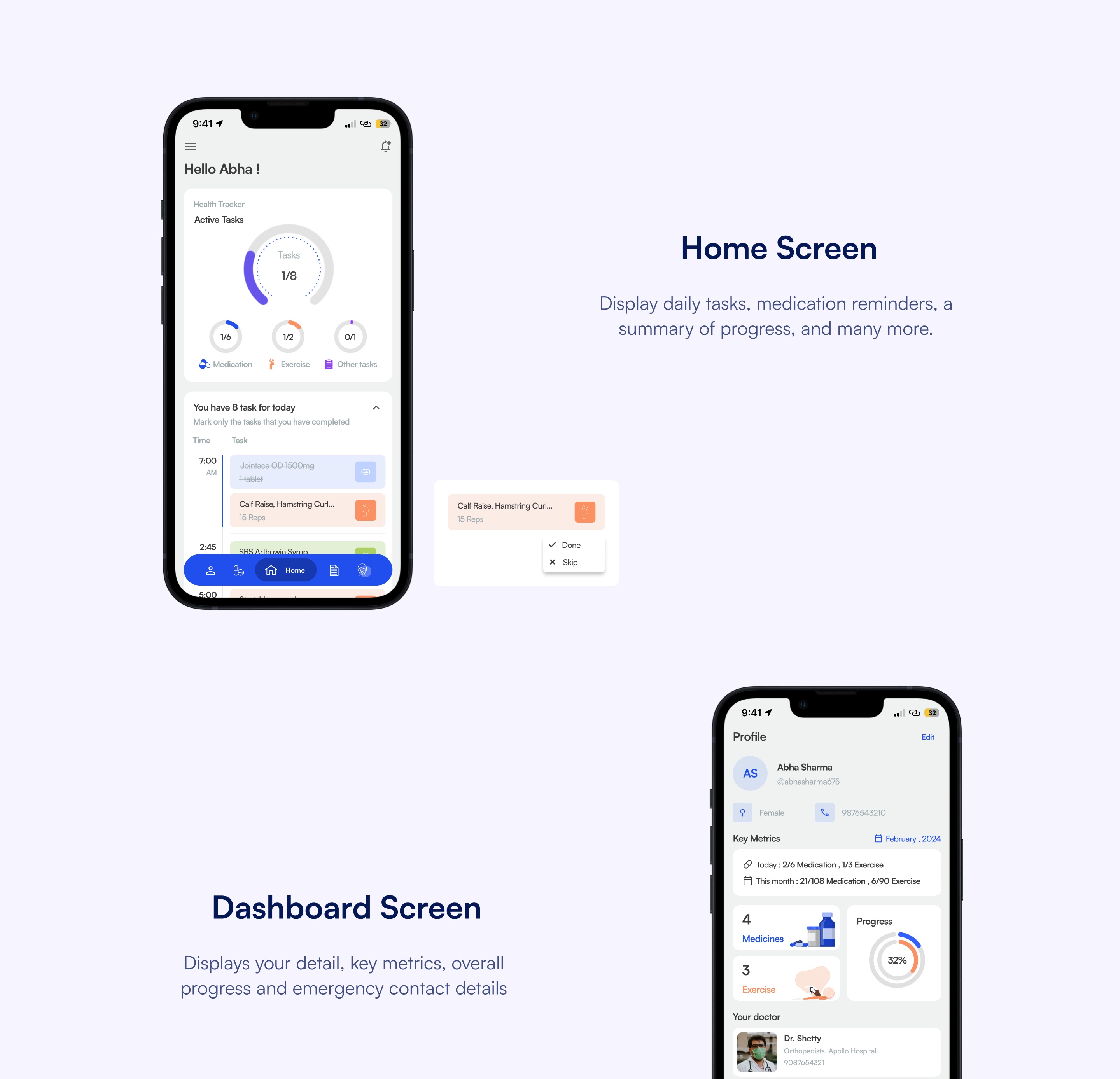
Patient Dashboard: Glanceable Metrics & Active Tasks
The home dashboard presents patient recovery percentage, remaining medications for today, and immediate access to both the treating orthopedic surgeon (Dr. Shetty) and emergency contacts.
- Key Metric Cards: Progress percentage, completed exercises, and remaining daily doses.
- 1-Tap Emergency Access: Quick call button for both family caregiver and hospital desk.
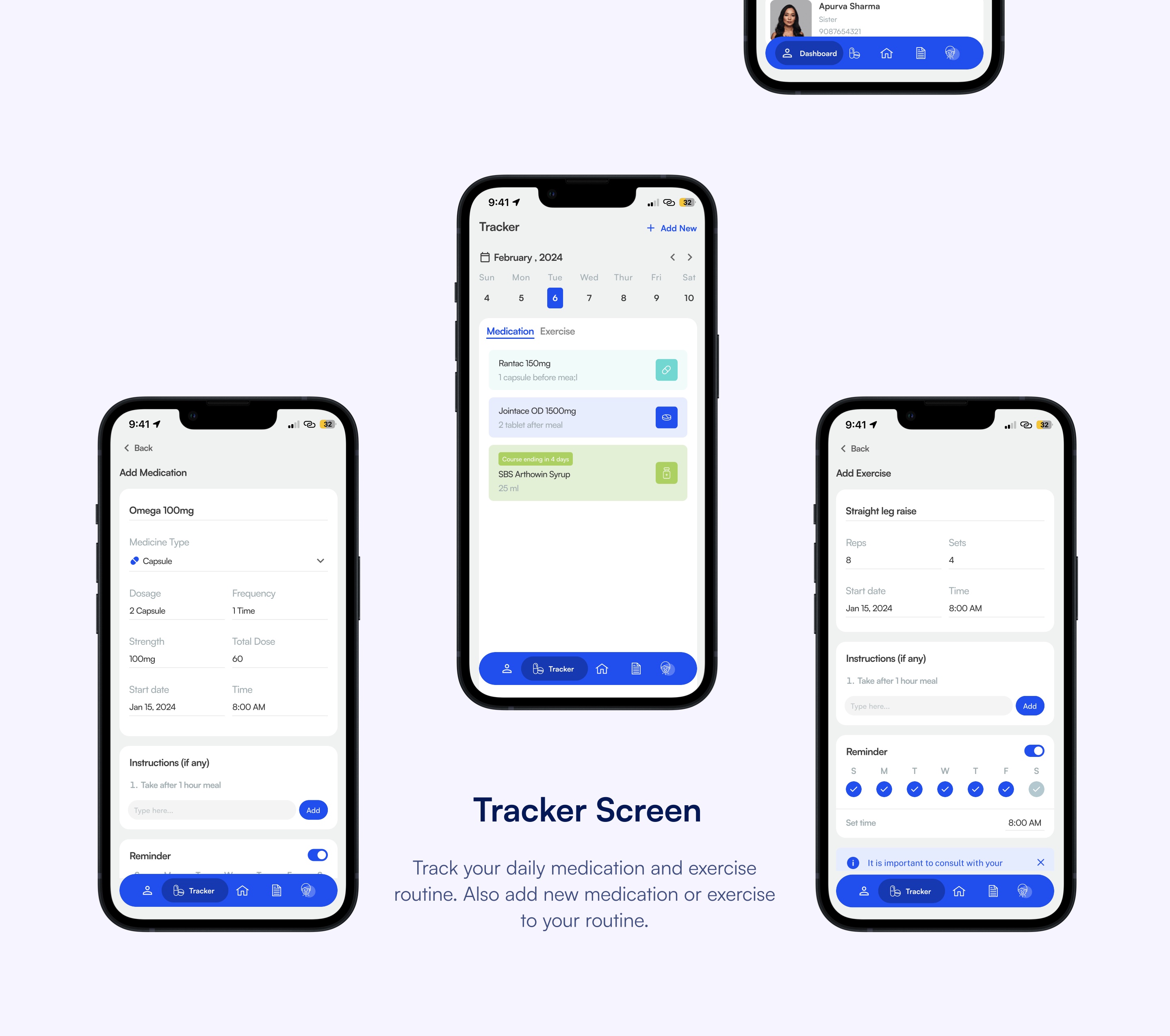
Daily Schedule Tracker & Easy Task Logging
Chronological timeline displaying every medication, dosage timing (e.g. 1 capsule before meal), and targeted physical therapy exercise (e.g. Calf raises, 15 reps).
- Done / Skip States: Eliminates double-dosing doubts with clear visual checkmarks.
- Add Medicine Flow: Simple modal for entering course length, dosage strength, and reminder times.
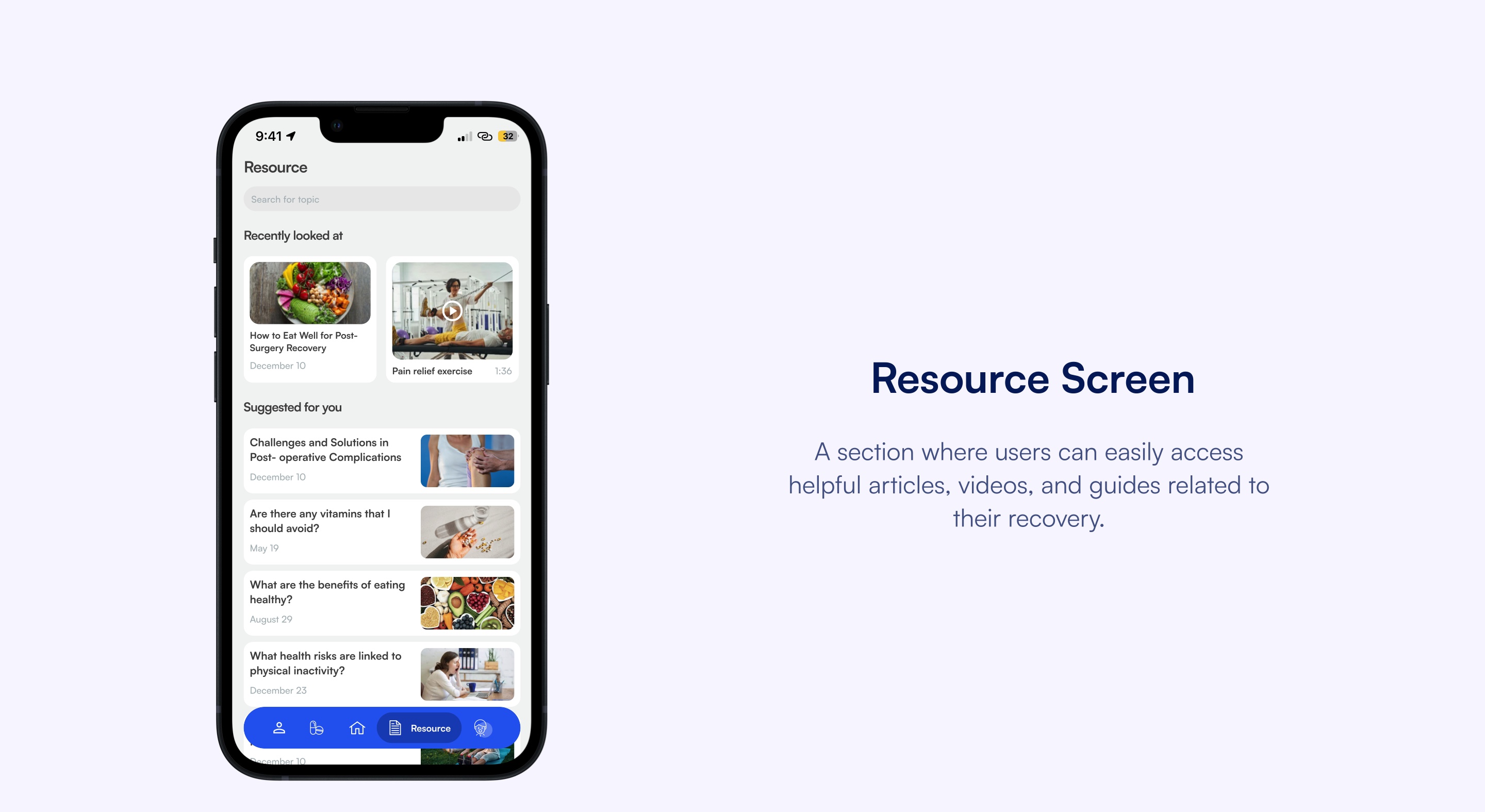
Clinical Knowledge & Guided Recovery Resources
Curated post-surgical guides, dietary nutrition plans for wound healing, and video demonstrations of doctor-approved stretches to prevent injury.
- Video Exercise Library: Step-by-step video tutorials preventing posture mistakes during rehab.
- Vetted Articles: Reliable guidance that replaces panic-driven Google searches.
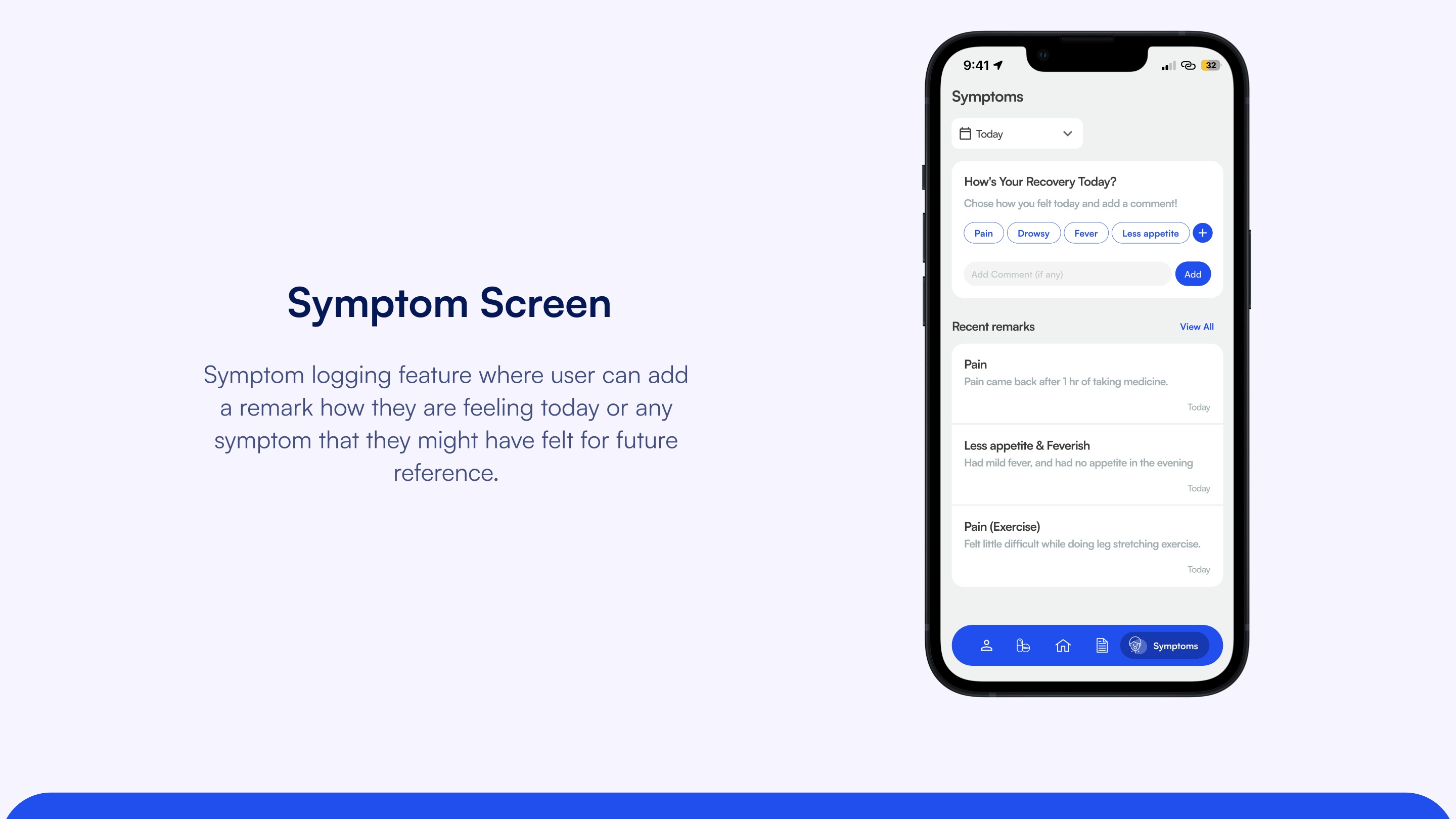
Symptom Journaling & Clinical Remark History
Patients can log daily physical symptoms (Pain, Drowsiness, Fever, Appetite loss) with contextual notes, creating an accurate, timestamped clinical record for subsequent doctor follow-ups.
- 1-Tap Symptom Tags: Rapid capture even when the patient is fatigued or in discomfort.
- Doctor-Ready History: Replaces vague recall with concrete timestamps (e.g. "Pain returned 1hr post-dose").
Designing for Vulnerable Users Requires Empathy and Clarity
Post-operative patients are not ordinary app users — they are recovering under physical pain, medication brain-fog, and emotional distress. Designing RecovEase demonstrated that high legibility, reassuring visual tones, and reduced cognitive friction are clinical necessities, not just aesthetic choices.
Project Highlights
Designed by
Rakhi Sharma • UX Case Study
Key Focus
Post-operative adherence & anxiety reduction
Primary Artifact
End-to-end mobile design system & prototypes